


US$21.90 / piece

US$94.05 / piece

US$22.90 / piece

US$445.55 / piece

US$759.05 / piece

US$2,290.00 / piece

US$219.00 / piece

US$4,650.00 / piece

US$99.00 / piece

US$65.55 / piece

US$98.00 / piece

US$85.00 / piece

US$189.05 / piece

US$521.55 / piece

US$149.00 / piece

US$269.00 / piece
Description
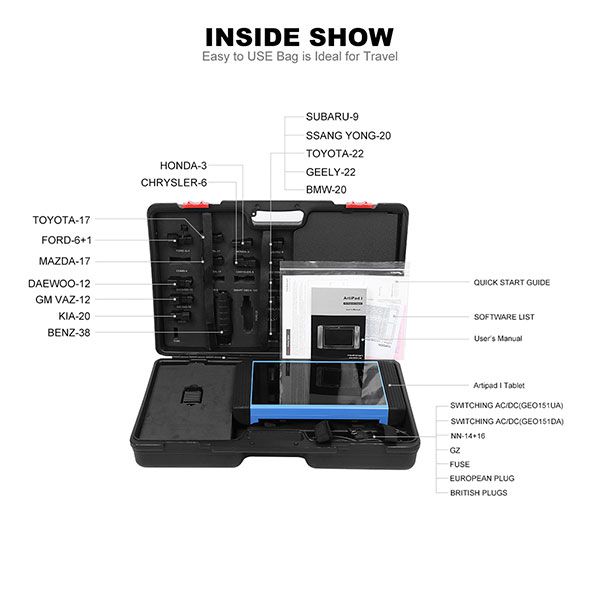
TOPDON ArtiPad I Diagnostic Tool
Overview
The TOPDON ArtiPad I is a comprehensive diagnostic tool designed for professional vehicle technicians. It offers a wide range of features, including wireless Bluetooth diagnosis, instant remote technical support, and advanced hardware configurations.
Key Features
- Multitask-capable Android 5.1 operating system
- 8-core 2.0GHz processor for fast performance
- 12" Retina display with 1920x1200 resolution
- Wi-Fi, Bluetooth 4.1, HDMI, and USB connectivity
- VCI Bluetooth wireless diagnosis within an 80ft range
- Instant remote technical support via Repair Info application
Specifications
| Item | Specification |
|---|---|
| Operating System | Android 5.1 |
| Processor | 8-core 2.0GHz |
| Memory | 2GB RAM & 64GB Embedded Memory (expandable to 128GB) |
| Display | 12" Retina display, 1920x1200 resolution, Capacitive touch screen |
| Connectivity | 802.11a/b/g/n/ac Wi-Fi, Bluetooth 4.1, RJ45 Ethernet, USB 2.0/3.0, HDMI 1.4a |
| Camera | Rear: 8MP autofocus with flashlight, Front: 2MP |
| Sensors | Gravity Accelerometer |
| Audio | Mic, Dual Speakers, 3.5mm stereo/headset jack |
| Battery | 15000mAh Lithium-polymer, DC/5V/3A |
| Dimensions | 376 x 220 x 50 mm |
| Weight | 2.1 KG |
Package Includes
- 1 x ArtiPad I tablet
- 1 x VCI connector
- 1 x OBDII extension cable
- 1 x Power adaptor
- 1 x USB cable
- 1 x OBDI adaptor
- 1 x Cigarette lighter adapter
- 1 x Battery clamps cable
- 1 x Password envelope
- 1 x Adaptor cable kit
- 1 x Audi-4 adaptor
- 1 x BENZ-14 adaptor
- 1 x BENZ-38 adaptor
- 1 x BMW-20 adaptor
- 1 x CHRYSLER-6 adaptor
- 1 x DAEWOO-12 adaptor
- 1 x DAIHATSU-4 adaptor
- 1 x FIAT-3 adaptor
- 1 x FORD-6+1 adaptor
FAQs
- Q1: How to save power?
A1: Please turn off the screen while ArtiPad I keeps idle. Set a shorter standby time, decrease the brightness of the screen, and disable GPS or WLAN if not in use. - Q2: What should I do in case I forgot the screen lock?
A2: You can set a pattern or password lock. If forgotten, consult the device provider or reset your ArtiPad I (risk of data loss). - Q3: How to do if the system runs slow?
A3: Stop unnecessary apps, uninstall unused apps, and reboot the tablet if issues persist. - Q4: How to reset ArtiPad I?
A4: Go to Settings → Back & Reset → Factory data reset → Clear all data (backup important data first). - Q5: How to register your ArtiPad I or new VCI connector?
A5: Ensure a stable network, then follow the registration steps in the user manual or via Personal Center → Activate Connector. - Q6: How to update the APK and diagnostic software?
A6: Navigate to Software Upgrade, select all software, and click Update. Maintain a stable network connection during download. - Q7: How to pair the VCI connector with the ArtiPad I handset?
A7: Turn on ignition, connect VCI to DLC, enable Bluetooth on ArtiPad I, search for devices, and pair using default code (0000 or 1234).

Previous: VVDI2 Full Kit + Xhorse VVDI MB Tool with 1 Year Unlimited Token
Recommend Items
 US$249.00
 US$340.00
 US$217.55
 US$105.00
 US$2,290.00
 US$819.00
 US$990.00
 US$69.00
 US$1,140.00
 US$407.55
 US$65.00
 US$19.00


Special Items
 US$4.90
 US$298.00
 US$5.90
 US$99.75
 US$778.05
 US$24.50
 US$165.00
 US$59.00
 US$19.00
 US$79.90
 US$9.90
 US$55.00


